Matcher: Flexible Optics Matching in Ocelot
The new Matcher will be available from version 26.03 and is currently in the dev branch.
ocelot.cpbd.matcher is a new object-oriented matching API.
It is designed to be more flexible and clearer than the legacy cpbd.match.py
workflow, while staying physics-oriented.
Why a New Matcher?
Compared with legacy match.py, matcher gives you:
- A clear object model:
MatchProblem+ variables + targets + objectives. - Generic variable control:
vary_element(...)can vary any numeric quantity (element field) of any element (for examplek1,angle,l, cavityv, cavityphi). - Per-variable bounds via
limits=(low, high). - Per-target controls:
weight,tol,relation. - Generic user-defined objective functions (
minimize_function,objective_function) and custom objective classes. - Linked variables for shared hardware (for example one power supply driving several quads).
- Direct support for Twiss targets, global Twiss limits, Twiss deltas, and R-matrix targets.
- Better diagnostics in solve result (
target_reports,objective_reports).
Legacy cpbd.match.py can still coexist. New scripts can adopt matcher
incrementally.
Matching Model
Think in three blocks:
- Variables (
Vary): what optimizer is allowed to change. - Targets (
Target): constraints you want to satisfy. - Objectives (
Objective): extra terms to minimize.
Everything contributes residuals. The solver minimizes:
sum(weighted_residual_i^2).
Main Classes and Their Roles
MatchProblem: central container (lattice, initial Twiss, periodic mode, variables, targets, objectives, solve/evaluate entry points).Vary: one optimization knob.PowerSupplyVary: one knob applied to multiple elements with optional scales.Targetsubclasses: Twiss, Twiss delta, global Twiss, R-matrix, etc.Objectivesubclasses: generic function objective, I5 objective, custom user objectives.MatchState: optics snapshot for one evaluation.MatchResult: solve output and reports.
MatchState (what you can use in custom objectives)
During each evaluation, matcher builds a MatchState with:
twiss_start: effective initial Twiss used in this evaluation.twiss_by_element: dictionaryelement -> Twiss.twiss_sequence: ordered list of Twiss along lattice sequence.twiss_end: Twiss at end of line for current state.r_matrix(start, end): cached transfer matrix accessor return.
Important for periodic matching:
periodic=False: start Twiss is your currenttwiss0.periodic=True: matcher computes periodic Twiss from current lattice and uses it astwiss_start. In this mode, varying initial Twiss directly is usually not meaningful.
Workflow
Typical solve flow:
- Create
MatchProblem(lat, tw0, periodic=...). - Add variables (
vary_element,vary_twiss,vary_linked_elements). - Add targets (
target_twiss,target_global,target_twiss_delta,target_rmatrix,target_rmatrix_block, ...). - Add objectives (
minimize_function,objective_function,minimize_i5_integral, custom objective). - Run
solve(solver=..., max_iter=..., tol=...). - Inspect
result.variables,result.target_reports,result.objective_reports,result.merit.
Solvers and Bounds
Pass solver in problem.solve(solver="...").
Bounds-capable solvers:
ls_trf(least-squares trust-region reflective, recommended default)ls_dogbox(least-squares dogbox)least_squares(alias tols_trf)simplex(alias fornelder-mead)nelder-meadpowelllbfgsb(alias forl-bfgs-b)l-bfgs-bslsqp
Solvers without bounds support:
ls_lmbfgscg
If any active variable has finite bounds and solver does not support bounds,
matcher raises ValueError (intentional hard error, not warning).
objective_function Modes
objective_function(func, mode=...) supports:
mode="residual": function output is treated directly as residual(s).mode="minimize": residual isfunc(state) - target.mode="target": relation/tolerance logic (==,<=,>=, etc.).
Practical note:
residualandminimize(target=0)are equivalent for same function output.- Use
residualwhen your function already returns an error-like vector. - Use
minimizefor clearer intent with explicit scalar target.
Limitations and Practical Notes
- This is local nonlinear optimization. Good initial conditions still matter.
- Large one-shot problems with many knobs/constraints can converge to poor optics. Regularization and staged matching are often better.
- Weights and scales matter. Normalize residual terms so no single term dominates unintentionally.
- For
periodic=True, fitting entrance Twiss viavary_twiss(...)is usually not the right control strategy.
Examples
1) Generic Pattern (I5 as regular objective)
Treat I5 like any other objective term instead of build in shortcut problem.minimize_i5_integral(weight=1e14).
import numpy as np

from ocelot.cpbd.matcher import MatchProblem
from ocelot.cpbd.beam_params import radiation_integrals

# Assume: lat, tw0, q1, q2, end are already defined
problem = MatchProblem(lat, tw0, periodic=True)

# Variables
problem.vary_element(q1, quantity="k1", limits=(-5, 5))
problem.vary_element(q2, quantity="k1", limits=(-5, 5))

# Twiss targets
problem.target_twiss(end, "beta_x", 12.0, weight=1e6)
problem.target_twiss(end, "beta_y", 9.0, weight=1e6)

# I5 as a generic objective
problem.minimize_function(
    lambda state: radiation_integrals(state.lat, state.twiss_start, nsuperperiod=1)[4],
    name="I5",
    weight=1e14,
)

# Or use built-in shortcut:
# problem.minimize_i5_integral(weight=1e14)

result = problem.solve(solver="ls_trf", max_iter=300)
print(result.success, result.merit)
2) Custom Integral Objective
You can minimize any function of MatchState.
How it works:
- You pass a callable to
problem.minimize_function(...). - Matcher stores it.
- On every evaluation/iteration, matcher builds the current
MatchStateinternally and calls your function asfunc(state). - You do not create
stateyourself.
Important Python note:
- In
lambda state: ...,stateis just the function argument name. - It can be any name (
lambda ms: ...is equivalent). - The matcher passes the current
MatchStateobject into that argument.
Equivalent forms:
# lambda form
problem.minimize_function(
    lambda state: np.trapz(
        [tw.beta_x for tw in state.twiss_sequence],
        [tw.s for tw in state.twiss_sequence],
    ),
    name="int_beta_x_ds",
    weight=1.0,
)

# named-function form (exact same behavior)
def integral_beta_x(match_state):
    return np.trapz(
        [tw.beta_x for tw in match_state.twiss_sequence],
        [tw.s for tw in match_state.twiss_sequence],
    )

problem.minimize_function(integral_beta_x, name="int_beta_x_ds", weight=1.0)
3) Custom Objective Class
Use custom class when you need reusable logic.
import numpy as np
from ocelot.cpbd.matcher import Objective

class EndSObjective(Objective):
    def __init__(self, target_s, **kwargs):
        super().__init__(**kwargs)
        self.target_s = float(target_s)

    def residuals(self, state):
        # Matcher minimizes sum(residual^2)
        return np.array([state.twiss_end.s - self.target_s], dtype=float)

# Add custom objective to problem
problem.add_objective(EndSObjective(target_s=12.0, name="end_s_obj", weight=1e6))
4) Global Beta Limits
# Keep beta_x and beta_y below limits everywhere
problem.target_global(
    quantity="beta_x",
    value=30.0,
    relation="<=",
    weight=1e6,
    tol=0.0,
    name="beta_x_max",
)

problem.target_global(
    quantity="beta_y",
    value=35.0,
    relation="<=",
    weight=1e6,
    tol=0.0,
    name="beta_y_max",
)

result = problem.solve(solver="ls_trf", max_iter=300)
print(result.success, result.merit)
5) Vary Initial Twiss
Use when entrance optics are unknown and must be fitted.
from ocelot.cpbd.matcher import MatchProblem

# Assume: lat, tw0, end are already defined
problem = MatchProblem(lat, tw0, periodic=False)

# Fit entrance optics
problem.vary_twiss(quantity="beta_x", limits=(0.1, 300.0), name="bx0")
problem.vary_twiss(quantity="alpha_x", limits=(-20.0, 20.0), name="ax0")

# Optional: also fit dispersion
problem.vary_twiss(quantity="Dx", limits=(-2.0, 2.0), name="Dx0")
problem.vary_twiss(quantity="Dxp", limits=(-1.0, 1.0), name="Dxp0")

# Match Twiss at end
problem.target_twiss(end, "beta_x", 12.0, weight=1e6)
problem.target_twiss(end, "alpha_x", 0.0, weight=1e6)

result = problem.solve(solver="ls_trf", max_iter=300)
print(result.success, result.variables["bx0"], result.variables["ax0"])
6) Vary Bend Angle and Drift Length
vary_element(...) is generic, not only for quadrupole k1.
from ocelot.cpbd.matcher import MatchProblem
from ocelot.cpbd.elements import Bend, Drift, Marker
from ocelot.cpbd.magnetic_lattice import MagneticLattice

# Simple line
start = Marker(eid="S")
b = Bend(l=1.0, angle=0.20, eid="B1")
d = Drift(l=3.0, eid="D1")
end = Marker(eid="E")
lat = MagneticLattice((start, b, d, end))

problem = MatchProblem(lat, tw0, periodic=False)

# Vary bend angle with bounds
problem.vary_element(b, quantity="angle", limits=(0.15, 0.30), name="B1_angle")

# Vary drift length with bounds
problem.vary_element(d, quantity="l", limits=(2.0, 5.0), name="D1_l")

# Example targets
problem.target_twiss(end, "Dx", 0.12, weight=1e6)
problem.target_twiss(end, "s", 4.2, weight=1e6)

result = problem.solve(solver="ls_trf", max_iter=200)
print(result.success, result.variables["B1_angle"], result.variables["D1_l"])
7) Vary Cavity Voltage/Phase and Target End Energy
Cavity quantities are standard element fields:
vin GVphiin degrees
End energy is Twiss quantity E in GeV.
import numpy as np
from ocelot.cpbd.matcher import MatchProblem
from ocelot.cpbd.elements import Cavity, Marker
from ocelot.cpbd.magnetic_lattice import MagneticLattice

start = Marker(eid="S")
cav = Cavity(l=0.5, v=0.02, phi=0.0, freq=1.3e9, eid="C1")
end = Marker(eid="E")
lat = MagneticLattice((start, cav, end))

problem = MatchProblem(lat, tw0, periodic=False)

# Example 1: fit voltage to reach final energy
problem.vary_element(cav, quantity="v", limits=(0.0, 0.05), name="C1_v")
problem.target_twiss(end, "E", value=1.03, weight=1e6)
result = problem.solve(solver="ls_trf", max_iter=200)
print("voltage fit:", result.success, result.variables["C1_v"])

# Example 2: fit phase to reach final energy (keep v fixed)
cav.v = 0.03
cav.phi = 20.0
problem2 = MatchProblem(lat, tw0, periodic=False)
problem2.vary_element(cav, quantity="phi", limits=(0.0, 60.0), name="C1_phi")
problem2.target_twiss(end, "E", value=1.0 + 0.03 * np.cos(np.deg2rad(30.0)), weight=1e6)
result2 = problem2.solve(solver="ls_trf", max_iter=200)
print("phase fit:", result2.success, result2.variables["C1_phi"])
8) Target One R-matrix Element Between Two Elements
You can constrain any transfer matrix entry R[i, j] between two elements
in lattice order (start <= end). This can be internal markers, not only
line start/end.
from ocelot.cpbd.matcher import MatchProblem
from ocelot.cpbd.elements import Drift, Marker
from ocelot.cpbd.magnetic_lattice import MagneticLattice

start = Marker(eid="S")
d0 = Drift(l=0.4, eid="D0")
m1 = Marker(eid="M1")
dvar = Drift(l=1.1, eid="DVAR")
m2 = Marker(eid="M2")
d2 = Drift(l=0.7, eid="D2")
end = Marker(eid="E")
lat = MagneticLattice((start, d0, m1, dvar, m2, d2, end))

problem = MatchProblem(lat, tw0, periodic=False)
problem.vary_element(dvar, quantity="l", limits=(0.0, 5.0), name="DVAR_l")

# Match R12 (Python indices i=0, j=1) between M1 and M2
problem.target_rmatrix(m1, m2, i=0, j=1, value=2.7, weight=1e6)

result = problem.solve(solver="ls_trf", max_iter=200)
print(result.success, result.variables["DVAR_l"])
9) Two Quadrupoles on One Power Supply
One shared knob can control multiple elements.
from ocelot.cpbd.matcher import MatchProblem

# Assume: lat, tw0, q1, q2, end are already defined
problem = MatchProblem(lat, tw0, periodic=False)

# One knob drives both quadrupoles.
# Example below uses opposite polarity.
ps = problem.vary_linked_elements(
    elements=[q1, q2],
    scales=[1.0, -1.0],
    quantity="k1",
    name="PS_Q1Q2",
    limits=(-2.0, 2.0),
)

problem.target_twiss(end, "beta_x", 12.0, weight=1e6)
problem.target_twiss(end, "beta_y", 9.0, weight=1e6)

result = problem.solve(solver="ls_trf", max_iter=300)
print(result.success, result.variables["PS_Q1Q2"])
print("q1.k1 =", q1.k1, "q2.k1 =", q2.k1)
10) Regularization (Small and Smooth Quad Strengths)
Regularization is straightforward with residual-vector objectives.
import numpy as np

# Assume quads are ordered along s:
quads = [q1, q2, q3, q4, q5]

# Optional reference profile (here: all zeros)
k_ref = np.zeros(len(quads))

# Normalization scales to control relative strength of penalties
k_scale = 0.2     # absolute strength penalty
dk_scale = 0.05   # neighbor-difference penalty

# Penalize large strengths: sum((k_i - k_ref_i)^2)
problem.objective_function(
    lambda state: (np.array([q.k1 for q in quads]) - k_ref) / k_scale,
    mode="residual",
    name="reg_k_l2",
    weight=1.0,
)

# Penalize rapid changes: sum((k_{i+1} - k_i)^2)
problem.objective_function(
    lambda state: np.diff(np.array([q.k1 for q in quads])) / dk_scale,
    mode="residual",
    name="reg_k_smooth",
    weight=1.0,
)
11) Phase Delta Target with wrap_phase=True
For mux/muy delta targets, phase values differing by 2*pi are physically
equivalent.
import numpy as np

problem.target_twiss_delta(
    start=elem1,
    end=elem2,
    quantity="mux",
    value=3.0 * np.pi / 2.0,
    relation="==",
    wrap_phase=True,  # wrap residual to [-pi, pi]
    weight=1e6,
    tol=1e-4,
    name="dmu_x_elem1_elem2",
)
Why it matters:
- Without wrapping, equivalent phases can look numerically far apart
(for example
-pi/2vs3*pi/2gives raw-2*pidifference). - With
wrap_phase=True, residual is near zero for equivalent phase targets.
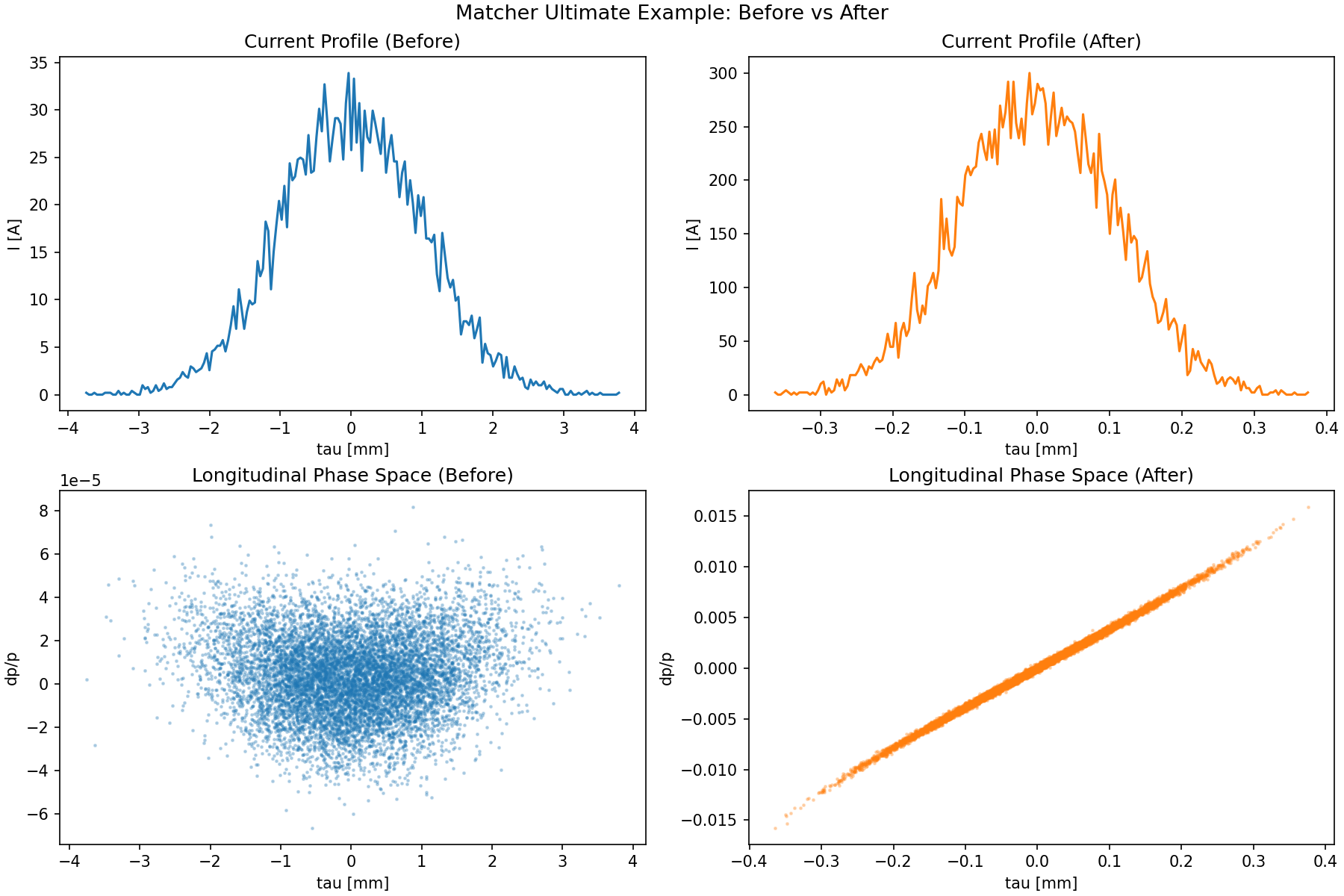
12) Ultimate Example: Custom Chicane Knob + Tracking Objective + Energy Target
Reference script:
This example combines three patterns in one workflow:
- Custom variable (
Vary) with coupled lattice updates: one knobCHICANE_thetaupdates four dipole angles, edge angles (e1,e2), and chicane shoulder drifts consistently. - Custom objective (
Objective) with particle tracking inside residual evaluation: match a target peak current from trackedParticleArray. - Standard matcher target:
final energy constraint with
problem.target_twiss(end, "E", ...).
# Build a C-shape chicane section.
z_distance = 1.0
d_ref = Drift(l=0.5)
d12 = Drift(l=shoulders_from_theta(THETA0, z_distance))
d34 = Drift(l=shoulders_from_theta(THETA0, z_distance))

b1 = SBend(l=0.2, angle=-THETA0, e1=0.0, e2=-THETA0, tilt=0.0, fint=0.0, eid="B1")
b2 = SBend(l=0.2, angle=+THETA0, e1=THETA0, e2=0.0, tilt=0.0, fint=0.0, eid="B2")
b3 = SBend(l=0.2, angle=+THETA0, e1=0.0, e2=THETA0, tilt=0.0, fint=0.0, eid="B3")
b4 = SBend(l=0.2, angle=-THETA0, e1=-THETA0, e2=0.0, tilt=0.0, fint=0.0, eid="B4")
chicane = (b1, d12, b2, d_ref, b3, d34, b4)

# RF section and end marker.
c11 = Cavity(l=0.5, v=0.15, phi=0.0, freq=1.3e9, eid="C11")
c13 = Cavity(l=0.5, v=0.0166, phi=180.0, freq=3.9e9, eid="C13")
end = Marker(eid="END")

cell = [d_ref, c11, d_ref, c13, d_ref, *chicane, d_ref, end]
lat = MagneticLattice(cell)

tw0 = Twiss(beta_x=10.0, beta_y=10.0, emit_xn=1e-6, emit_yn=1e-6, E=0.005)
parray_init = generate_parray(tws=tw0, nparticles=10000, charge=250e-12,  chirp=0.0, sigma_p=SIGMA_P, sigma_tau=SIGMA_TAU_M)

# Track once before matching as a reference.
_tb, tracked_before = track(lat, copy.deepcopy(parray_init), print_progress=False)
i_before = peak_current(tracked_before)

# Create matcher problem.
problem = MatchProblem(lat, tw0)

# Custom composite variable: one theta knob drives the full chicane geometry.
def get_theta() -> float:
    return float(b2.angle)

def set_theta(theta: float) -> None:
    # 1) Update linked dipole angles.
    b1.angle = -theta
    b2.angle = +theta
    b3.angle = +theta
    b4.angle = -theta

    # 2) Update linked edge angles.
    b1.e1, b1.e2 = 0.0, -theta
    b2.e1, b2.e2 = +theta, 0.0
    b3.e1, b3.e2 = 0.0, +theta
    b4.e1, b4.e2 = -theta, 0.0

    # 3) Recompute chicane shoulder drifts from geometry.
    l_shoulder = shoulders_from_theta(theta, z_distance)
    d12.l = l_shoulder
    d34.l = l_shoulder

problem.add_variable(
    Vary(
        name="CHICANE_theta",
        getter=get_theta,
        setter=set_theta,
        limits=THETA_LIMITS,
    )
)

# Standard RF variables.
problem.vary_element(c11, quantity="v", limits=(0.10, 0.20), name="C11_v")
problem.vary_element(c11, quantity="phi", limits=(-40.0, 40.0), name="C11_phi")
problem.vary_element(c13, quantity="v", limits=(0.01, 0.025), name="C13_v")
problem.vary_element(c13, quantity="phi", limits=(90.0, 270.0), name="C13_phi")

# Custom tracking objective: peak current target.
class PeakCurrentObjective(Objective):
    """Tracking-based objective for peak current matching."""

    def __init__(self, parray_template, target_current: float, num_bins: int = 200, **kwargs):
        super().__init__(**kwargs)
        self.parray_template = parray_template
        self.target_current = float(target_current)
        self.num_bins = int(num_bins)

    def residuals(self, state):
        # Track a fresh copy each evaluation so residuals always use the same
        # initial particle distribution.
        parray = copy.deepcopy(self.parray_template)
        _tws_track, tracked = track(state.lat, parray, print_progress=False)
        i_peak = peak_current(tracked, num_bins=self.num_bins)
        return np.array([(i_peak - self.target_current) / self.target_current], dtype=float)

# Add custom objective to the problem.
problem.add_objective(
    PeakCurrentObjective(
        parray_template=parray_init,
        target_current=300,  # A
        name="peak_current_obj",
        weight=1e1,
    )
)

# Standard physics constraint: final energy at end marker (130 MeV).
problem.target_twiss(end, "E", value=0.13, weight=1e6)

# Solve.
result = problem.solve(solver="ls_trf", max_iter=MAX_ITER)
Run the full demo script:
python demos/ebeam/matcher_ex.py
Script output:
- console summary with optimized variables and achieved peak current
- generated figure:
demos/ebeam/matcher_ex_before_after.png
Before/after image from the demo:
Regression + Benchmark Test
The test module unit_tests/ebeam_test/matcher/matcher_test.py includes:
- functional regression tests for matcher capabilities
- large-lattice optics cases
- benchmark timing test
Run full matcher tests:
pytest -q unit_tests/ebeam_test/matcher/matcher_test.py
Update benchmark baseline:
MATCHER_BENCH_UPDATE=1 pytest -q unit_tests/ebeam_test/matcher/matcher_test.py::test_match_optics_benchmark
Enforce speed regression guard (for example max 25% slowdown):
MATCHER_BENCH_ENFORCE=1 MATCHER_BENCH_MAX_SLOWDOWN=1.25 pytest -q unit_tests/ebeam_test/matcher/matcher_test.py::test_match_optics_benchmark