Matcher: Flexible Optics Matching in Ocelot
The new Matcher will be available from version 26.03 and is currently in the dev branch.
ocelot.cpbd.matcher is a new object-oriented matching API.
It is designed to be more flexible and clearer than the legacy cpbd.match.py
workflow, while staying physics-oriented.
Why a New Matcher?
Compared with legacy match.py, matcher gives you:
- A clear object model:
MatchProblem+ variables + targets + objectives. - Generic variable control:
vary_element(...)can vary any numeric quantity (element field) of any element (for examplek1,angle,l, cavityv, cavityphi). - Per-variable bounds via
limits=(low, high). - Per-target controls:
weight,tol,relation. - Generic user-defined objective functions (
minimize_function,objective_function) and custom objective classes. - Linked variables for shared hardware (for example one power supply driving several quads).
- Direct support for Twiss targets, selected periodic Twiss targets, global Twiss limits, Twiss deltas, R-matrix targets, and R-matrix based phase-advance/Floquet targets.
- Better diagnostics in solve result (
target_reports,objective_reports).
Legacy cpbd.match.py can still coexist. New scripts can adopt matcher
incrementally.
Matching Model
Think in three blocks:
- Variables (
Vary): what optimizer is allowed to change. - Targets (
Target): constraints you want to satisfy. - Objectives (
Objective): extra terms to minimize.
Everything contributes residuals. The solver minimizes:
sum(weighted_residual_i^2).
Main Classes and Their Roles
MatchProblem: central container (lattice, initial Twiss, periodic mode, variables, targets, objectives, solve/evaluate entry points).Vary: one optimization knob.PowerSupplyVary: one knob applied to multiple elements with optional scales.Targetsubclasses: Twiss, Twiss delta, global Twiss, R-matrix, etc.Objectivesubclasses: generic function objective, I5 objective, custom user objectives.MatchState: optics snapshot for one evaluation.MatchResult: solve output and reports.
MatchState (what you can use in custom objectives)
During each evaluation, matcher builds a MatchState with:
twiss_start: effective initial Twiss used in this evaluation.twiss_by_element: dictionaryelement -> Twiss.twiss_sequence: ordered list of Twiss along lattice sequence.twiss_end: Twiss at end of line for current state.r_matrix(start, end): cached transfer matrix accessor.
Important for periodic matching:
periodic=False: start Twiss is your currenttwiss0.periodic=True: matcher computes periodic Twiss from current lattice and uses it astwiss_start. In this mode, varying initial Twiss directly is usually not meaningful.
Workflow
Typical solve flow:
- Create
MatchProblem(lat, tw0, periodic=...). - Add variables (
vary_element,vary_twiss,vary_linked_elements). - Add targets (
target_twiss,target_periodic_twiss,target_global,target_twiss_delta,target_phase_advance,target_rmatrix,target_rmatrix_block, ...). - Add objectives (
minimize_function,objective_function,minimize_i5_integral, custom objective). - Run
solve(solver=..., max_iter=..., tol=...). - Inspect
result.variables,result.target_reports,result.objective_reports,result.merit.
Target Relations and Tolerances
Most scalar targets accept a relation argument. The default is "==",
so a target like problem.target_twiss(end, "beta_x", 12.0) means match
beta_x to 12.0. Use relation="<=" or relation=">=" for one-sided
constraints. tol defines the accepted error band: inside the tolerance the
residual is zero.
Examples:
problem.target_twiss(end, "beta_x", 12.0, relation="==", tol=1e-4)
problem.target_twiss(end, "beta_y", 40.0, relation="<=", tol=0.0)
problem.target_rmatrix(start, end, i=0, j=1, value=8.0, relation=">=")
target_global(...) also has relation, but its default is "<=" because it
is most often used as a lattice-wide limit. target_periodic_twiss(...) has the
same relation option and defaults to "=="; it applies the relation to
end - start with target value zero.
Phase Advance Targets
There are two different phase quantities in the matcher:
target_twiss_delta(..., "mux")or"muy"uses the phase stored in tracked Twiss objects. This is a delta of a propagated Twiss quantity. It depends on the entrance Twiss unless that Twiss is the matched periodic Twiss for the same map.target_phase_advance(...)uses the transfer matrix block between two elements and computes the Floquet phase/exponent from the normalized trace. This is independent of the supplied entrance Twiss and is the right target for matching a lattice or cell phase advance.
This distinction matters for unmatched optics. A lattice has one R-matrix and
therefore one Floquet phase for a given transverse plane, but two different
unmatched twiss0 values can give different tracked mux/muy increments
through the same lattice. Matching those tracked values can therefore converge
to optics that satisfy the bookkeeping phase of the chosen Twiss frame, not the
lattice eigenphase.
For linacs and other accelerating sections, the 2x2 transverse block can be
scaled so det(R_plane) is positive but not exactly one. The target therefore
uses the normalized trace
trace(R_plane) / (2 * np.sqrt(np.linalg.det(R_plane)))
instead of plain trace(R_plane) / 2.
Use target_phase_advance(...) for cell phase matching:
problem.target_phase_advance(
    start=lat.sequence[0],
    end=lat.sequence[-1],
    plane="x",
    value=np.pi / 2.0,
    weight=1e6,
    tol=1e-6,
)
The same target also covers unstable one-plane maps. Use a positive imaginary target for a positive hyperbolic Floquet exponent:
problem.target_phase_advance(
    start=lat.sequence[0],
    end=lat.sequence[-1],
    plane="x",
    value=2j,
    weight=1e6,
)
For sign-flipping unstable maps, use np.pi + 2j.
Solvers and Bounds
Pass solver in problem.solve(solver="...").
Bounds-capable solvers:
ls_trf(least-squares trust-region reflective, recommended default)ls_dogbox(least-squares dogbox)least_squares(alias tols_trf)simplex(alias fornelder-mead)nelder-meadpowelllbfgsb(alias forl-bfgs-b)l-bfgs-bslsqp
Solvers without bounds support:
ls_lmbfgscg
If any active variable has finite bounds and solver does not support bounds,
matcher raises ValueError (intentional hard error, not warning).
objective_function Modes
objective_function(func, mode=...) supports:
mode="residual": function output is treated directly as residual(s).mode="minimize": residual isfunc(state) - target.mode="target": relation/tolerance logic (==,<=,>=, etc.).
Practical note:
residualandminimize(target=0)are equivalent for same function output.- Use
residualwhen your function already returns an error-like vector. - Use
minimizefor clearer intent with explicit scalar target.
Limitations and Practical Notes
- This is local nonlinear optimization. Good initial conditions still matter.
- Large one-shot problems with many knobs/constraints can converge to poor optics. Regularization and staged matching are often better.
- Weights and scales matter. Normalize residual terms so no single term dominates unintentionally.
- For
periodic=True, fitting entrance Twiss viavary_twiss(...)is usually not the right control strategy. - For partial periodicity, use
target_periodic_twiss(...)instead ofperiodic=True.
Examples
1) Simple End Twiss Match
Start with a small line: vary two quadrupoles and match Twiss parameters at the end marker.
from ocelot import *
from ocelot.cpbd.matcher import MatchProblem

start = Marker(eid="START")
d = Drift(l=0.5, eid="D")
q1 = Quadrupole(l=0.2, k1=0.5, eid="Q1")
q2 = Quadrupole(l=0.2, k1=-0.5, eid="Q2")
end = Marker(eid="END")
lat = MagneticLattice((start, d, q1, d, q2, d, end))

tw0 = Twiss()
tw0.beta_x = 10.0
tw0.beta_y = 10.0
tw0.E = 1.0

problem = MatchProblem(lat, tw0, periodic=False)
problem.vary_element(q1, quantity="k1", limits=(-5, 5))
problem.vary_element(q2, quantity="k1", limits=(-5, 5))

problem.target_twiss(end, "beta_x", 7.5, weight=1e6, tol=1e-5)
problem.target_twiss(end, "beta_y", 13.0, weight=1e6, tol=1e-5)

result = problem.solve(solver="ls_trf", max_iter=300)
print(result.success, result.merit)
Common things to inspect after matching:
# Final knob values as a dictionary
print(result.variables)

# Full variable objects, including limits and current values
for var in problem.variables:
    print(var.name, var.get(), var.limits)

# If you varied entrance Twiss, use problem.twiss0, not the original tw0 object.
tws = twiss(lat, problem.twiss0)

# Current optics state and target diagnostics
merit, target_reports, objective_reports, state = problem.evaluate()
print(state.twiss_at(end).beta_x, state.twiss_at(end).beta_y)
for report in target_reports:
    print(report.name, report.residual_norm, report.met)
2) Global Beta Limits
# Keep beta_x and beta_y below limits everywhere
problem.target_global(
    quantity="beta_x",
    value=30.0,
    relation="<=",
    weight=1e6,
    tol=0.0,
    name="beta_x_max",
)

problem.target_global(
    quantity="beta_y",
    value=35.0,
    relation="<=",
    weight=1e6,
    tol=0.0,
    name="beta_y_max",
)

result = problem.solve(solver="ls_trf", max_iter=300)
print(result.success, result.merit)
3) Full Periodic Twiss Solution
Use periodic=True when the initial Twiss should be the full periodic solution
of the current lattice. In this mode matcher recomputes the periodic Twiss for
each trial set of variables.
import numpy as np

from ocelot.cpbd.matcher import MatchProblem

# Assume: lat, tw0, qf, qd, end are already defined.
tw0.E = 1.0

problem = MatchProblem(lat, tw0, periodic=True)
problem.vary_element(qf, quantity="k1", limits=(-5, 5), name="qf.k1")
problem.vary_element(qd, quantity="k1", limits=(-5, 5), name="qd.k1")

# Example: match the phase advance of one periodic cell.
problem.target_phase_advance(
    lat.sequence[0], end, "x", np.pi / 3.0, weight=1e6, tol=1e-6
)
problem.target_phase_advance(
    lat.sequence[0], end, "y", np.pi / 3.0, weight=1e6, tol=1e-6
)

result = problem.solve(solver="ls_trf", max_iter=300)
merit, reports, objectives, state = problem.evaluate()
print(result.success, state.twiss_start.beta_x, state.twiss_start.beta_y)
For periodic=True, state.twiss_start is the computed periodic Twiss. Do not
expect problem.twiss0 to be the fitted entrance Twiss in this mode.
4) Partial Periodic Twiss Targets
Use target_periodic_twiss(...) when only selected Twiss quantities should be
equal at two locations, while other quantities are matched independently.
from ocelot import *
from ocelot.cpbd.matcher import MatchProblem

start = Marker(eid="START")
d = Drift(l=0.5, eid="D")
q1 = Quadrupole(l=0.2, k1=0.5, eid="Q1")
q2 = Quadrupole(l=0.2, k1=-0.5, eid="Q2")
end = Marker(eid="END")
lat = MagneticLattice((start, d, q1, d, q2, d, end))

tw0 = Twiss()
tw0.beta_x = 9.0
tw0.beta_y = 10.0
tw0.E = 1.0

problem = MatchProblem(lat, tw0, periodic=False)
problem.vary_element(q1, quantity="k1", limits=(-5, 5))
problem.vary_element(q2, quantity="k1", limits=(-5, 5))
problem.vary_twiss("alpha_x", limits=(-5, 5))
problem.vary_twiss("alpha_y", limits=(-5, 5))

# Strict targets at the end.
problem.target_twiss(end, "alpha_x", 0.0, weight=1e6)
problem.target_twiss(end, "beta_y", 9.0, weight=1e6)

# Periodic only for selected quantities.
problem.target_periodic_twiss("beta_x", start, end, weight=1e6)
problem.target_periodic_twiss("alpha_y", start, end, weight=1e6)

result = problem.solve(solver="ls_trf", max_iter=300)

# Entrance alphas were variables, so inspect the solved initial Twiss here.
print(problem.twiss0.alpha_x, problem.twiss0.alpha_y)

merit, reports, objectives, state = problem.evaluate()
print(state.twiss_at(start).beta_x, state.twiss_at(end).beta_x)
print(state.twiss_at(start).alpha_y, state.twiss_at(end).alpha_y)
target_periodic_twiss adds a normal residual target end - start == 0. It does
not compute a full periodic Twiss seed.
5) Vary Initial Twiss
Use when entrance optics are unknown and must be fitted.
from ocelot.cpbd.matcher import MatchProblem

# Assume: lat, tw0, end are already defined
problem = MatchProblem(lat, tw0, periodic=False)

# Fit entrance optics
problem.vary_twiss(quantity="beta_x", limits=(0.1, 300.0), name="bx0")
problem.vary_twiss(quantity="alpha_x", limits=(-20.0, 20.0), name="ax0")

# Optional: also fit dispersion
problem.vary_twiss(quantity="Dx", limits=(-2.0, 2.0), name="Dx0")
problem.vary_twiss(quantity="Dxp", limits=(-1.0, 1.0), name="Dxp0")

# Match Twiss at end
problem.target_twiss(end, "beta_x", 12.0, weight=1e6)
problem.target_twiss(end, "alpha_x", 0.0, weight=1e6)

result = problem.solve(solver="ls_trf", max_iter=300)
print(result.success, result.variables["bx0"], result.variables["ax0"])
6) Vary Bend Angle and Drift Length
vary_element(...) is generic, not only for quadrupole k1.
from ocelot.cpbd.matcher import MatchProblem
from ocelot.cpbd.elements import Bend, Drift, Marker
from ocelot.cpbd.magnetic_lattice import MagneticLattice

# Simple line
start = Marker(eid="S")
b = Bend(l=1.0, angle=0.20, eid="B1")
d = Drift(l=3.0, eid="D1")
end = Marker(eid="E")
lat = MagneticLattice((start, b, d, end))

problem = MatchProblem(lat, tw0, periodic=False)

# Vary bend angle with bounds
problem.vary_element(b, quantity="angle", limits=(0.15, 0.30), name="B1_angle")

# Vary drift length with bounds
problem.vary_element(d, quantity="l", limits=(2.0, 5.0), name="D1_l")

# Example targets
problem.target_twiss(end, "Dx", 0.12, weight=1e6)
problem.target_twiss(end, "s", 4.2, weight=1e6)

result = problem.solve(solver="ls_trf", max_iter=200)
print(result.success, result.variables["B1_angle"], result.variables["D1_l"])
7) Vary Cavity Voltage/Phase and Target End Energy
Cavity quantities are standard element fields:
vin GVphiin degrees
End energy is Twiss quantity E in GeV.
import numpy as np
from ocelot.cpbd.matcher import MatchProblem
from ocelot.cpbd.elements import Cavity, Marker
from ocelot.cpbd.magnetic_lattice import MagneticLattice

start = Marker(eid="S")
cav = Cavity(l=0.5, v=0.02, phi=0.0, freq=1.3e9, eid="C1")
end = Marker(eid="E")
lat = MagneticLattice((start, cav, end))

problem = MatchProblem(lat, tw0, periodic=False)

# Example 1: fit voltage to reach final energy
problem.vary_element(cav, quantity="v", limits=(0.0, 0.05), name="C1_v")
problem.target_twiss(end, "E", value=1.03, weight=1e6)
result = problem.solve(solver="ls_trf", max_iter=200)
print("voltage fit:", result.success, result.variables["C1_v"])

# Example 2: fit phase to reach final energy (keep v fixed)
cav.v = 0.03
cav.phi = 20.0
problem2 = MatchProblem(lat, tw0, periodic=False)
problem2.vary_element(cav, quantity="phi", limits=(0.0, 60.0), name="C1_phi")
problem2.target_twiss(end, "E", value=1.0 + 0.03 * np.cos(np.deg2rad(30.0)), weight=1e6)
result2 = problem2.solve(solver="ls_trf", max_iter=200)
print("phase fit:", result2.success, result2.variables["C1_phi"])
8) Target One R-matrix Element Between Two Elements
You can constrain any transfer matrix entry R[i, j] between two elements
in lattice order (start <= end). This can be internal markers, not only
line start/end.
from ocelot.cpbd.matcher import MatchProblem
from ocelot.cpbd.elements import Drift, Marker
from ocelot.cpbd.magnetic_lattice import MagneticLattice

start = Marker(eid="S")
d0 = Drift(l=0.4, eid="D0")
m1 = Marker(eid="M1")
dvar = Drift(l=1.1, eid="DVAR")
m2 = Marker(eid="M2")
d2 = Drift(l=0.7, eid="D2")
end = Marker(eid="E")
lat = MagneticLattice((start, d0, m1, dvar, m2, d2, end))

problem = MatchProblem(lat, tw0, periodic=False)
problem.vary_element(dvar, quantity="l", limits=(0.0, 5.0), name="DVAR_l")

# Match R12 (Python indices i=0, j=1) between M1 and M2
problem.target_rmatrix(m1, m2, i=0, j=1, value=2.7, weight=1e6)

result = problem.solve(solver="ls_trf", max_iter=200)
print(result.success, result.variables["DVAR_l"])
9) Target Phase Advance / Floquet Exponent
Use target_phase_advance(...) when the requested phase is a property of the
transfer matrix between two elements. This is usually what you want for a cell
or full-lattice phase target.
import numpy as np
from ocelot.cpbd.matcher import MatchProblem

# Assume: lat, tw0, qf, qd are already defined.
start = lat.sequence[0]
end = lat.sequence[-1]

problem = MatchProblem(lat, tw0, periodic=False)
problem.vary_element(qf, quantity="k1", limits=(-5, 5))
problem.vary_element(qd, quantity="k1", limits=(-5, 5))

# Stable phase advance in the x plane.
problem.target_phase_advance(
    start=start,
    end=end,
    plane="x",
    value=np.pi / 2.0,
    weight=1e6,
    tol=1e-6,
)

# Unstable y-plane target: positive Floquet exponent.
problem.target_phase_advance(
    start=start,
    end=end,
    plane="y",
    value=2j,
    weight=1e6,
)

result = problem.solve(solver="ls_trf", max_iter=300)
print(result.success, result.merit)
target_phase_advance uses state.r_matrix(start, end). The end element is
included, matching the standard MagneticLattice.transfer_maps(start, stop)
convention.
10) Two Quadrupoles on One Power Supply
One shared knob can control multiple elements.
from ocelot.cpbd.matcher import MatchProblem

# Assume: lat, tw0, q1, q2, end are already defined
problem = MatchProblem(lat, tw0, periodic=False)

# One knob drives both quadrupoles.
# Example below uses opposite polarity.
ps = problem.vary_linked_elements(
    elements=[q1, q2],
    scales=[1.0, -1.0],
    quantity="k1",
    name="PS_Q1Q2",
    limits=(-2.0, 2.0),
)

problem.target_twiss(end, "beta_x", 12.0, weight=1e6)
problem.target_twiss(end, "beta_y", 9.0, weight=1e6)

result = problem.solve(solver="ls_trf", max_iter=300)
print(result.success, result.variables["PS_Q1Q2"])
print("q1.k1 =", q1.k1, "q2.k1 =", q2.k1)
11) Regularization (Small and Smooth Quad Strengths)
Regularization is straightforward with residual-vector objectives.
import numpy as np

# Assume quads are ordered along s:
quads = [q1, q2, q3, q4, q5]

# Optional reference profile (here: all zeros)
k_ref = np.zeros(len(quads))

# Normalization scales to control relative strength of penalties
k_scale = 0.2     # absolute strength penalty
dk_scale = 0.05   # neighbor-difference penalty

# Penalize large strengths: sum((k_i - k_ref_i)^2)
problem.objective_function(
    lambda state: (np.array([q.k1 for q in quads]) - k_ref) / k_scale,
    mode="residual",
    name="reg_k_l2",
    weight=1.0,
)

# Penalize rapid changes: sum((k_{i+1} - k_i)^2)
problem.objective_function(
    lambda state: np.diff(np.array([q.k1 for q in quads])) / dk_scale,
    mode="residual",
    name="reg_k_smooth",
    weight=1.0,
)
12) Phase Delta Target with wrap_phase=True
For mux/muy delta targets, phase values differing by 2*pi can be treated
as equivalent in the tracked Twiss phase.
Use this only when you intentionally want a delta of the propagated Twiss
quantity. For lattice or cell phase matching, prefer target_phase_advance(...)
because it uses the transfer matrix and does not depend on unmatched entrance
Twiss.
import numpy as np

problem.target_twiss_delta(
    start=elem1,
    end=elem2,
    quantity="mux",
    value=3.0 * np.pi / 2.0,
    relation="==",
    wrap_phase=True,  # wrap residual to [-pi, pi]
    weight=1e6,
    tol=1e-4,
    name="dmu_x_elem1_elem2",
)
Why it matters:
- Without wrapping, equivalent phases can look numerically far apart
(for example
-pi/2vs3*pi/2gives raw-2*pidifference). - With
wrap_phase=True, residual is near zero for equivalent phase targets.
Advanced Objective Patterns
These patterns are useful when ordinary Twiss/R-matrix targets are not enough. They are placed here because the ultimate example below combines the same ideas.
Generic Pattern (I5 as regular objective)
Treat I5 like any other objective term. The equivalent built-in shortcut is problem.minimize_i5_integral(weight=1e14).
import numpy as np

from ocelot.cpbd.matcher import MatchProblem
from ocelot.cpbd.beam_params import radiation_integrals

# Assume: lat, tw0, q1, q2, end are already defined
problem = MatchProblem(lat, tw0, periodic=True)

# Variables
problem.vary_element(q1, quantity="k1", limits=(-5, 5))
problem.vary_element(q2, quantity="k1", limits=(-5, 5))

# Twiss targets
problem.target_twiss(end, "beta_x", 12.0, weight=1e6)
problem.target_twiss(end, "beta_y", 9.0, weight=1e6)

# I5 as a generic objective
problem.minimize_function(
    lambda state: radiation_integrals(state.lat, state.twiss_start, nsuperperiod=1)[4],
    name="I5",
    weight=1e14,
)

# Or use built-in shortcut:
# problem.minimize_i5_integral(weight=1e14)

result = problem.solve(solver="ls_trf", max_iter=300)
print(result.success, result.merit)
Custom Integral Objective
You can minimize any function of MatchState.
How it works:
- You pass a callable to
problem.minimize_function(...). - Matcher stores it.
- On every evaluation/iteration, matcher builds the current
MatchStateinternally and calls your function asfunc(state). - You do not create
stateyourself.
Important Python note:
- In
lambda state: ...,stateis just the function argument name. - It can be any name (
lambda ms: ...is equivalent). - The matcher passes the current
MatchStateobject into that argument.
Equivalent forms:
# lambda form
problem.minimize_function(
    lambda state: np.trapz(
        [tw.beta_x for tw in state.twiss_sequence],
        [tw.s for tw in state.twiss_sequence],
    ),
    name="int_beta_x_ds",
    weight=1.0,
)

# named-function form (exact same behavior)
def integral_beta_x(match_state):
    return np.trapz(
        [tw.beta_x for tw in match_state.twiss_sequence],
        [tw.s for tw in match_state.twiss_sequence],
    )

problem.minimize_function(integral_beta_x, name="int_beta_x_ds", weight=1.0)
Custom Objective Class
Use custom class when you need reusable logic.
import numpy as np
from ocelot.cpbd.matcher import Objective

class EndSObjective(Objective):
    def __init__(self, target_s, **kwargs):
        super().__init__(**kwargs)
        self.target_s = float(target_s)

    def residuals(self, state):
        # Matcher minimizes sum(residual^2)
        return np.array([state.twiss_end.s - self.target_s], dtype=float)

# Add custom objective to problem
problem.add_objective(EndSObjective(target_s=12.0, name="end_s_obj", weight=1e6))
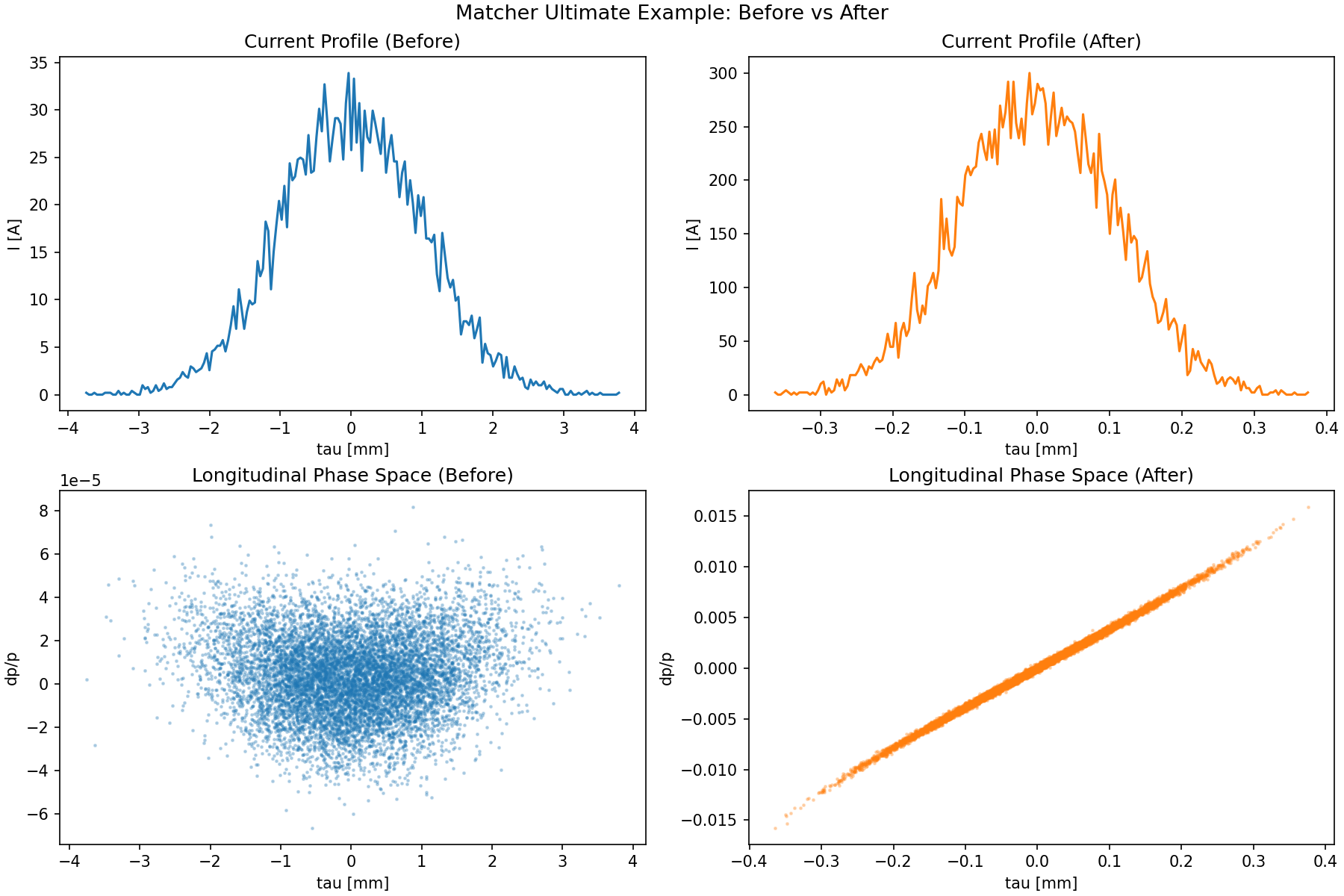
12) Ultimate Example: Custom Chicane Knob + Tracking Objective + Energy Target
Reference script:
This example combines three patterns in one workflow:
- Custom variable (
Vary) with coupled lattice updates: one knobCHICANE_thetaupdates four dipole angles, edge angles (e1,e2), and chicane shoulder drifts consistently. - Custom objective (
Objective) with particle tracking inside residual evaluation: match a target peak current from trackedParticleArray. - Standard matcher target:
final energy constraint with
problem.target_twiss(end, "E", ...).
# Build a C-shape chicane section.
z_distance = 1.0
d_ref = Drift(l=0.5)
d12 = Drift(l=shoulders_from_theta(THETA0, z_distance))
d34 = Drift(l=shoulders_from_theta(THETA0, z_distance))

b1 = SBend(l=0.2, angle=-THETA0, e1=0.0, e2=-THETA0, tilt=0.0, fint=0.0, eid="B1")
b2 = SBend(l=0.2, angle=+THETA0, e1=THETA0, e2=0.0, tilt=0.0, fint=0.0, eid="B2")
b3 = SBend(l=0.2, angle=+THETA0, e1=0.0, e2=THETA0, tilt=0.0, fint=0.0, eid="B3")
b4 = SBend(l=0.2, angle=-THETA0, e1=-THETA0, e2=0.0, tilt=0.0, fint=0.0, eid="B4")
chicane = (b1, d12, b2, d_ref, b3, d34, b4)

# RF section and end marker.
c11 = Cavity(l=0.5, v=0.15, phi=0.0, freq=1.3e9, eid="C11")
c13 = Cavity(l=0.5, v=0.0166, phi=180.0, freq=3.9e9, eid="C13")
end = Marker(eid="END")

cell = [d_ref, c11, d_ref, c13, d_ref, *chicane, d_ref, end]
lat = MagneticLattice(cell)

tw0 = Twiss(beta_x=10.0, beta_y=10.0, emit_xn=1e-6, emit_yn=1e-6, E=0.005)
parray_init = generate_parray(tws=tw0, nparticles=10000, charge=250e-12,  chirp=0.0, sigma_p=SIGMA_P, sigma_tau=SIGMA_TAU_M)

# Track once before matching as a reference.
_tb, tracked_before = track(lat, copy.deepcopy(parray_init), print_progress=False)
i_before = peak_current(tracked_before)

# Create matcher problem.
problem = MatchProblem(lat, tw0)

# Custom composite variable: one theta knob drives the full chicane geometry.
def get_theta() -> float:
    return float(b2.angle)

def set_theta(theta: float) -> None:
    # 1) Update linked dipole angles.
    b1.angle = -theta
    b2.angle = +theta
    b3.angle = +theta
    b4.angle = -theta

    # 2) Update linked edge angles.
    b1.e1, b1.e2 = 0.0, -theta
    b2.e1, b2.e2 = +theta, 0.0
    b3.e1, b3.e2 = 0.0, +theta
    b4.e1, b4.e2 = -theta, 0.0

    # 3) Recompute chicane shoulder drifts from geometry.
    l_shoulder = shoulders_from_theta(theta, z_distance)
    d12.l = l_shoulder
    d34.l = l_shoulder

problem.add_variable(
    Vary(
        name="CHICANE_theta",
        getter=get_theta,
        setter=set_theta,
        limits=THETA_LIMITS,
    )
)

# Standard RF variables.
problem.vary_element(c11, quantity="v", limits=(0.10, 0.20), name="C11_v")
problem.vary_element(c11, quantity="phi", limits=(-40.0, 40.0), name="C11_phi")
problem.vary_element(c13, quantity="v", limits=(0.01, 0.025), name="C13_v")
problem.vary_element(c13, quantity="phi", limits=(90.0, 270.0), name="C13_phi")

# Custom tracking objective: peak current target.
class PeakCurrentObjective(Objective):
    """Tracking-based objective for peak current matching."""

    def __init__(self, parray_template, target_current: float, num_bins: int = 200, **kwargs):
        super().__init__(**kwargs)
        self.parray_template = parray_template
        self.target_current = float(target_current)
        self.num_bins = int(num_bins)

    def residuals(self, state):
        # Track a fresh copy each evaluation so residuals always use the same
        # initial particle distribution.
        parray = copy.deepcopy(self.parray_template)
        _tws_track, tracked = track(state.lat, parray, print_progress=False)
        i_peak = peak_current(tracked, num_bins=self.num_bins)
        return np.array([(i_peak - self.target_current) / self.target_current], dtype=float)

# Add custom objective to the problem.
problem.add_objective(
    PeakCurrentObjective(
        parray_template=parray_init,
        target_current=300,  # A
        name="peak_current_obj",
        weight=1e1,
    )
)

# Standard physics constraint: final energy at end marker (130 MeV).
problem.target_twiss(end, "E", value=0.13, weight=1e6)

# Solve.
result = problem.solve(solver="ls_trf", max_iter=MAX_ITER)
Run the full demo script:
python demos/ebeam/matcher_ex.py
Script output:
- console summary with optimized variables and achieved peak current
- generated figure:
demos/ebeam/matcher_ex_before_after.png
Before/after image from the demo:
Regression + Benchmark Test
The test module unit_tests/ebeam_test/matcher/matcher_test.py includes:
- functional regression tests for matcher capabilities
- large-lattice optics cases
- benchmark timing test
Run full matcher tests:
pytest -q unit_tests/ebeam_test/matcher/matcher_test.py
Update benchmark baseline:
MATCHER_BENCH_UPDATE=1 pytest -q unit_tests/ebeam_test/matcher/matcher_test.py::test_match_optics_benchmark
Enforce speed regression guard (for example max 25% slowdown):
MATCHER_BENCH_ENFORCE=1 MATCHER_BENCH_MAX_SLOWDOWN=1.25 pytest -q unit_tests/ebeam_test/matcher/matcher_test.py::test_match_optics_benchmark