This notebook was created by Sergey Tomin (sergey.tomin@desy.de). Source and license info is on GitHub. January 2018.
Double Bend Achromat
We designed a simple lattice to demonstrate the basic concepts and syntax of the optics functions calculation. Also, we chose DBA to demonstrate the periodic solution for the optical functions calculation.
from __future__ import print_function

# the output of plotting commands is displayed inline within frontends,
# directly below the code cell that produced it
%matplotlib inline

# import from Ocelot main modules and functions
from ocelot import *

# import from Ocelot graphical modules
from ocelot.gui.accelerator import *
Creating lattice
Ocelot has following elements: Drift, Quadrupole, Sextupole, Octupole, Bend, SBend, RBend, Edge, Multipole, Hcor, Vcor, Solenoid, Cavity, Monitor, Marker, Undulator.
# defining of the drifts
D1 = Drift(l=2.)
D2 = Drift(l=0.6)
D3 = Drift(l=0.3)
D4 = Drift(l=0.7)
D5 = Drift(l=0.9)
D6 = Drift(l=0.2)

# defining of the quads
Q1 = Quadrupole(l=0.4, k1=-1.3)
Q2 = Quadrupole(l=0.8, k1=1.4)
Q3 = Quadrupole(l=0.4, k1=-1.7)
Q4 = Quadrupole(l=0.5, k1=1.3)

# defining of the bending magnet
B = Bend(l=2.7, k1=-.06, angle=2*pi/16., e1=pi/16., e2=pi/16.)

# defining of the sextupoles
SF = Sextupole(l=0.01, k2=1.5) #random value
SD = Sextupole(l=0.01, k2=-1.5) #random value

# cell creating
cell = (D1, Q1, D2, Q2, D3, Q3, D4, B, D5, SD, D5, SF, D6, Q4, D6,
        SF, D5, SD, D5, B, D4, Q3, D3, Q2, D2, Q1, D1)
cell
    (<Drift: name=ID_41638795_ at 0x2815f6aa0>,
     <Quadrupole: name=ID_48212357_ at 0x2815f5d50>,
     <Drift: name=ID_92167354_ at 0x2815f6260>,
     <Quadrupole: name=ID_62144763_ at 0x2815f5de0>,
     <Drift: name=ID_65974384_ at 0x2815f69e0>,
     <Quadrupole: name=ID_10916876_ at 0x2815f5db0>,
     <Drift: name=ID_95483235_ at 0x2815f4850>,
     <Bend: name=ID_90868229_ at 0x2815f5f60>,
     <Drift: name=ID_55934688_ at 0x2815f4ac0>,
     <Sextupole: name=ID_22464080_ at 0x11818fee0>,
     <Drift: name=ID_55934688_ at 0x2815f4ac0>,
     <Sextupole: name=ID_30803941_ at 0x2815f5ff0>,
     <Drift: name=ID_49578218_ at 0x2815f4eb0>,
     <Quadrupole: name=ID_27836471_ at 0x2815f5ed0>,
     <Drift: name=ID_49578218_ at 0x2815f4eb0>,
     <Sextupole: name=ID_30803941_ at 0x2815f5ff0>,
     <Drift: name=ID_55934688_ at 0x2815f4ac0>,
     <Sextupole: name=ID_22464080_ at 0x11818fee0>,
     <Drift: name=ID_55934688_ at 0x2815f4ac0>,
     <Bend: name=ID_90868229_ at 0x2815f5f60>,
     <Drift: name=ID_95483235_ at 0x2815f4850>,
     <Quadrupole: name=ID_10916876_ at 0x2815f5db0>,
     <Drift: name=ID_65974384_ at 0x2815f69e0>,
     <Quadrupole: name=ID_62144763_ at 0x2815f5de0>,
     <Drift: name=ID_92167354_ at 0x2815f6260>,
     <Quadrupole: name=ID_48212357_ at 0x2815f5d50>,
     <Drift: name=ID_41638795_ at 0x2815f6aa0>)
*hint: to see a simple description of the function put cursor inside () and press Shift-Tab or you can type sign ? before function. To extend dialog window press + *
Also, one can get more info about element just using print(element)
# all infro about an element can be seen with
print(B)
    Bend(l=2.70000, angle=3.926991e-01, e1=1.963495e-01, e2=1.963495e-01, eid="ID_90868229_")
The cell is a list of the simple objects which contain a physical information of lattice elements such as length, strength, voltage and so on. In order to create a transport map for every element and bind it with lattice object we have to create new Ocelot object - MagneticLattice() which makes these things automatically.
MagneticLattice(sequence, start=None, stop=None, method={"global": TransferMap}):
- sequence - list of the elements,
other parameters we will consider in tutorial N2.
Note, in the current version of OCELOT, transfer map belongs to element. See example# R matrix can be printed for any particular element.
print(Q1.R(energy=0))
    [array([[ 1.10581521,  0.4140116 ,  0.        ,  0.        ,  0.        ,
             0.        ],
           [ 0.53821508,  1.10581521,  0.        ,  0.        ,  0.        ,
             0.        ],
           [ 0.        ,  0.        ,  0.89779021,  0.38627683,  0.        ,
             0.        ],
           [ 0.        ,  0.        , -0.50215988,  0.89779021,  0.        ,
             0.        ],
           [ 0.        ,  0.        ,  0.        ,  0.        ,  1.        ,
             0.        ],
           [ 0.        ,  0.        ,  0.        ,  0.        ,  0.        ,
             1.        ]])]
# or you can directly get transfer maps
Q2.tms
[<ocelot.cpbd.transformations.transfer_map.TransferMap at 0x2815f5ea0>]
lat = MagneticLattice(cell)

# to see total length of the lattice
print("length of the cell: ", lat.totalLen, "m")

# or, for example, you can get R matrix for whole lattice

B, R, T = lat.transfer_maps(energy=0)
print(R)

    length of the cell:  20.34 m
    [[ 0.68401288  0.38454837  0.          0.          0.          0.05268746]
     [-1.38376969  0.68401288  0.          0.          0.          0.23072876]
     [ 0.          0.          0.81775255 -0.29733817  0.          0.        ]
     [ 0.          0.          1.11415489  0.81775255  0.          0.        ]
     [ 0.23072876  0.05268746  0.          0.          1.          0.02228572]
     [ 0.          0.          0.          0.          0.          1.        ]]
Optical function calculation
Uses:
- twiss() and periodic_twiss() functions and,
- Twiss() object contains Twiss parameters and other information at one certain position (s) of lattice
Use twiss(lattice, tws0, nPoints=None) to propagate explicit initial Twiss parameters. Use periodic_twiss(lattice, nPoints=None) to calculate and propagate a periodic solution.
You can change the number of points over the cell, If nPoints=None, then Twiss parameters are calculated at the end of each element. Both functions return a list of Twiss() objects.
You will see the Twiss object contains more information than just Twiss parameters.
tws = periodic_twiss(lat, nPoints=1000)

# to see Twiss parameters at the beginning of the cell, uncomment next line
# print(tws[0])
print("length = ", len(tws))
# to see Twiss parameters at the end of the cell, uncomment next line
print(tws[-1])
    length =  1000
    emit_x  = 0.0
    emit_y  = 0.0
    beta_x  = 0.5271613695963895
    beta_y  = 0.5165977895295946
    alpha_x = -4.440892098500626e-16
    alpha_y = 6.661338147750939e-15
    gamma_x = 1.8969523521149319
    gamma_y = 1.9357419258618653
    Dx      = 0.16673927708143915
    Dy      = 0.0
    Dxp     = 4.440892098500626e-16
    Dyp     = 0.0
    mux     = 7.100731992120578
    muy     = 5.669884351617213
    nu_x    = 1.1301165961167512
    nu_y    = 0.9023901213192655
    E       = 0.0
    s        = 20.34
# plot optical functions.
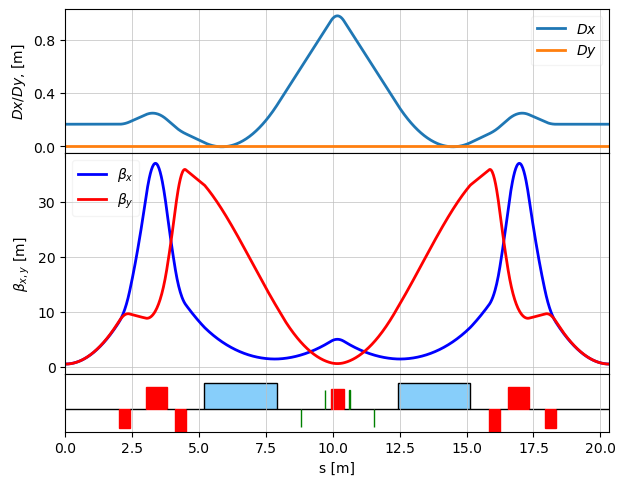
plot_opt_func(lat, tws, top_plot = ["Dx", "Dy"], legend=False, font_size=10)
plt.show()

# you also can use standard matplotlib functions for plotting
#s = [tw.s for tw in tws]
#bx = [tw.beta_x for tw in tws]
#plt.plot(s, bx)
#plt.show()
# you can play with quadrupole strength and try to make achromat
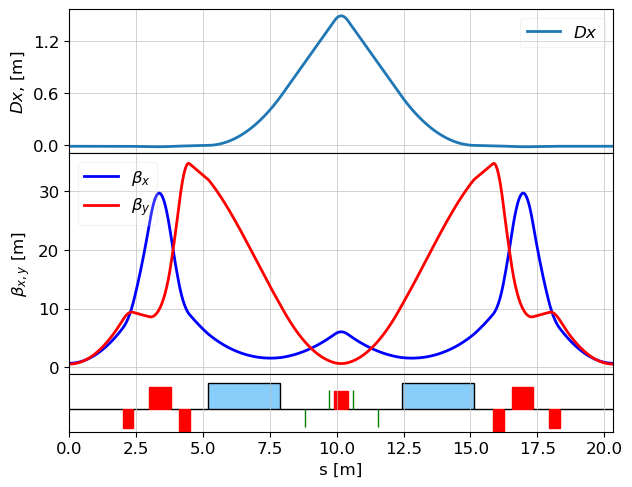
Q4.k1 = 1.18

# to make achromat uncomment next line
# Q4.k1 =  1.18543769836
# To use matching function, please see ocelot/demos/ebeam/dba.py

# updating transfer maps after changing element parameters.
#lat.update_transfer_maps() - not needed anymore

# recalculate twiss parameters. Argument nPoints is None by default - Twiss is calculating at the end of each element.
# If you want smooth twiss functions you can set number of points.
tws = periodic_twiss(lat, nPoints=1000)

plot_opt_func(lat, tws, legend=False)
plt.show()
More about periodic solution for the Twiss function
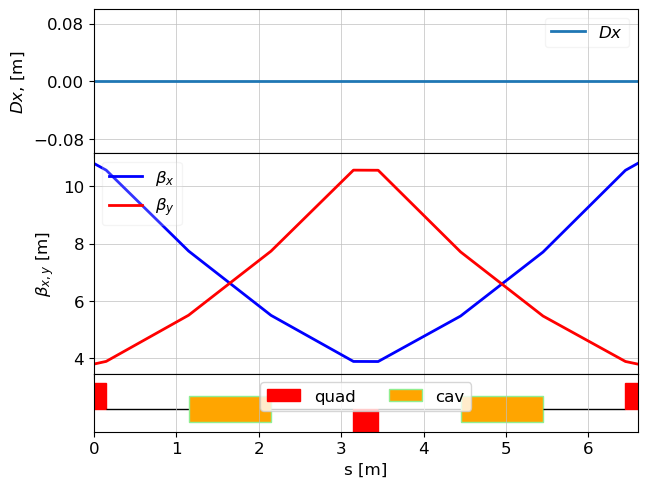
In some cases, one needs to quickly find a periodic solution. Here is a simple example with Cavity element:
d = Drift(l=1)
qf_h = Quadrupole(l=0.3/2, k1=1)
qd = Quadrupole(l=0.3, k1=-1)
c = Cavity(l=1, v=0.1, phi=10)

fodo_cell = (qf_h, d, c, d, qd, d,c,d,qf_h)
lat = MagneticLattice(fodo_cell)

tws0 = Twiss(E=0.5) # E = 0.5 GeV. Initial energy is required for the focusing effect caclulation in the Cavities
tws = periodic_twiss(lat, tws0)
plot_opt_func(lat, tws)
plt.show()
print("final Twiss:", tws[-1])
    final Twiss: emit_x  = 0.0
    emit_y  = 0.0
    beta_x  = 10.788391405898434
    beta_y  = 3.804736768160358
    alpha_x = -0.009168816187736392
    alpha_y = -0.005202303371245248
    gamma_x = 0.09270001704271681
    gamma_y = 0.26283738531638107
    Dx      = 0.0
    Dy      = 0.0
    Dxp     = 0.0
    Dyp     = 0.0
    mux     = 1.0722774502509878
    muy     = 1.0719541872890197
    nu_x    = 0.1706582565734186
    nu_y    = 0.17060680767510286
    E       = 0.6969615506024416
    s        = 6.6
another way to get periodic solution is
tws_p = periodic_twiss(lat, tws0)
print(tws_p[0])


    emit_x  = 0.0
    emit_y  = 0.0
    beta_x  = 10.788391405898436
    beta_y  = 3.804736768160356
    alpha_x = -0.00916881618773698
    alpha_y = -0.005202303371245172
    gamma_x = 0.0927000170427168
    gamma_y = 0.26283738531638123
    Dx      = 0.0
    Dy      = 0.0
    Dxp     = 0.0
    Dyp     = 0.0
    mux     = 0.0
    muy     = 0.0
    nu_x    = 0.0
    nu_y    = 0.0
    E       = 0.5
    s        = 0.0