This notebook was created by Sergey Tomin (sergey.tomin@desy.de) who was inspired by questions from E.R. Source and license info is on GitHub. June 2017.
Tutorial N7: Lattice Design, Matching, and Twiss Backtracking
Outline
- Design of a FODO lattice (undulator section) with specified maximum and minimum Twiss parameters
- Backtracking through chicanes
- Matching Twiss parameters in matching sections
Introduction
In this tutorial, we design a basic FEL beamline for an external seeding configuration. The layout consists of:
- Matching section
- Modulator – Chicane – Modulator – Chicane
- FODO lattice (undulator section)
The FODO section consists of repeating cells:
undulator – QF – undulator – QD – undulator – QF – ...
where QF and QD are focusing and defocusing quadrupoles, respectively.
We assume that:
- The maximum and minimum values of the beta functions in the undulator section are known
- The chicane geometry and parameters are predefined
- The Twiss parameters at the entrance of the matching section are given
While this problem can be solved in multiple (and possibly simpler) ways, we take a structured approach to demonstrate the use of Ocelot’s matching and backtracking tools:
- Match Twiss parameters within the FODO lattice to reach desired beta amplitudes using the new
MatcherAPI - Perform Twiss backtracking through the chicanes and modulators using the
twissfunction - Use the
MagneticLatticeclass to construct the full lattice
Optics Design and Matching
Optics design is still something of an art — and only a few people in the world truly excel at it (and the author of this notebook is certainly not one of them — at least not yet! :) ).
This tutorial is not aimed at producing an optimal design, but rather to illustrate the use of Ocelot’s Matcher API and Twiss backtracking in a practical setting.
# the output of plotting commands is displayed inline within
# frontends, directly below the code cell that produced it.
%matplotlib inline

from time import time

# this python library provides generic shallow (copy)
# and deep copy (deepcopy) operations
from copy import deepcopy

# import from Ocelot main modules and functions
from ocelot import *

# import from Ocelot graphical modules
from ocelot.gui.accelerator import *
initializing ocelot...
Step 1. FODO lattice matching
Design the simplest FODO lattice
# example of the FODO
U = Undulator(nperiods=50, lperiod=0.04, Kx=1)
D = Drift(l=0.5)
QF = Quadrupole(l=0.25, k1=1)
QD = Quadrupole(l=0.25, k1=-1)

M1 = Marker()
cell = (M1, QF, D, U, D, QD, QD, D, U, D, QF)

# suppose we have 5 cells or 10 undulators
fodo = cell*5
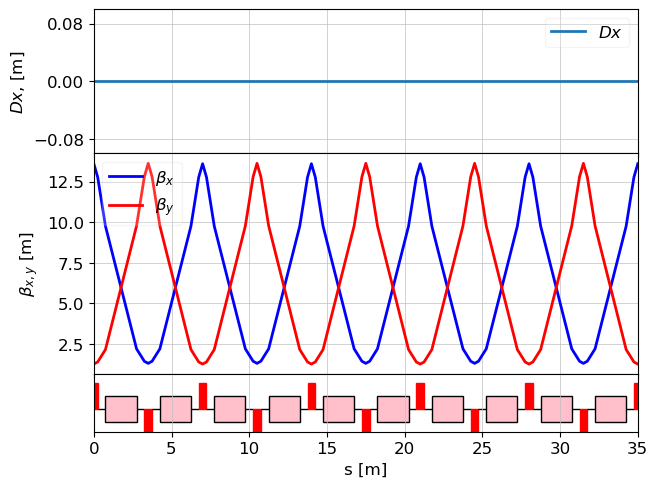
Periodic solution for FODO lattice
Note
- In the most cases to find twiss periodical solution we do not need to put the initial conditions and we can use following command to calculate twiss parameters: tws = twiss(lat)
BUT
- To take into account undulator vertical focusing effect we have to define the energy of the electron beam. and in that case we have to define initial condition like that:
# create MagneticLattice object
lat_fodo = MagneticLattice(fodo)

tws0 = Twiss()
# by default the all parameters are zero and
# that what we need to force the twiss function
# to calculate periodic solution

# And we need to define the beam energy
tws0.E = 1 # GeV

tws = twiss(lat_fodo, tws0=tws0)

plot_opt_func(lat_fodo, tws, legend=False)
plt.show()
Matching
In Ocelot there is a new matching module called Matcher, which is available from version 26.03 and is currently in the dev branch. We will perform matching using this new class. The old version of this tutorial using match() is available here.
from ocelot.cpbd.matcher import MatchProblem

# initial condition for twiss
tw0=tws[-1]

problem = MatchProblem(lat_fodo, tw0, periodic=True)

# Variables
problem.vary_element(QF, quantity="k1", limits=(-5, 5))
problem.vary_element(QD, quantity="k1", limits=(-5, 5))

# Twiss targets
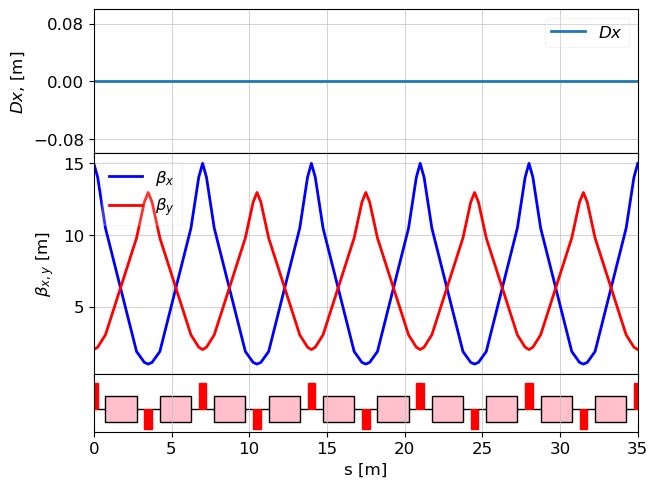
problem.target_twiss(M1, "beta_x", 15.0, weight=1e6)
problem.target_twiss(M1, "beta_y", 2.0, weight=1e6)

result = problem.solve(solver="ls_trf", max_iter=300)

# results
print("QF.k1 = ", QF.k1)
print("QD.k1 = ", QD.k1)
tws0=Twiss()
tws0.E = 1 # GeV

tws = twiss(lat_fodo, tws0=tws0)

# let's variable *tws_fodo* will be the twiss
# parameters on the FODO entrance
tws_fodo = tws[-1]

plot_opt_func(lat_fodo, tws, legend=False)
plt.show()
QF.k1 = 1.0710399450222212 QD.k1 = -0.8579468213377078
Step 2. Chicanes.
# undulator + chicane + undulator + chicane
modulator = Undulator(nperiods=10, lperiod=0.1, Kx = 2)

# Chicane from CSR example with small modifications

b1 = Bend(l = 0.5, angle=-0.0336, e1=0.0, e2=-0.0336, gap=0, tilt=0, eid='BB.393.B2')
b2 = Bend(l = 0.5, angle=0.0336, e1=0.0336, e2=0.0, gap=0, tilt=0,  eid='BB.402.B2')
b3 = Bend(l = 0.5, angle=0.0336, e1=0.0, e2=0.0336, gap=0, tilt=0, eid='BB.404.B2')
b4 = Bend(l = 0.5, angle=-0.0336, e1=-0.0336, e2=0.0, gap=0, tilt=0, eid='BB.413.B2')

d = Drift(l=1.5/np.cos(b2.angle))

start_csr = Marker()
stop_csr = Marker()

# define chicane frome the bends and drifts
chicane = [start_csr, Drift(l=1), b1, d, b2,
           Drift(l=1.5), b3, d, b4, Drift(l= 1.), stop_csr]


# For sake of buity add randomly couple of the quadrupoles

D1 = Drift(l=0.5)
echo = (D1, QF, D1, modulator, D1, QD, chicane,  QF, D1, modulator,D1, QD, chicane)
Chicane parameters
For example, one wants to know R56 of the whole chicane. It can be easily calculated
lat_chic = MagneticLattice(chicane)
# in that case energy is not important we do not have
# energy dependant elements here
R = lattice_transfer_map(lat_chic, energy=0)
print("R56 = ", R[4,5]*1000, "mm")
R56 = -4.1443249349333655 mm
Backtracking though chicanes.
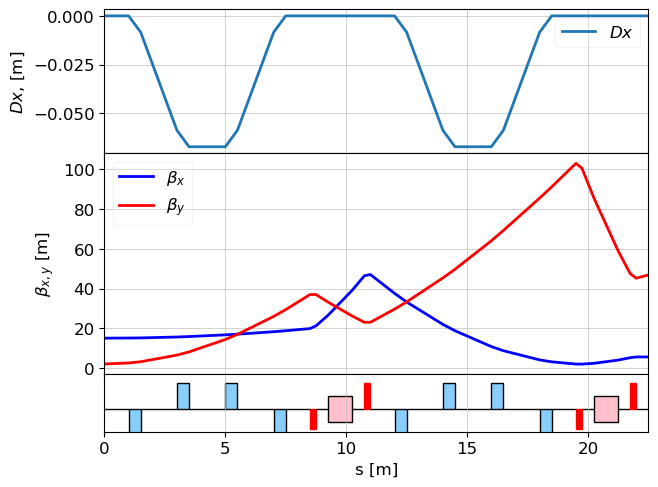
We know twiss parameters on the entrance of the FODO but for backtracking we need to
- invert alphas
- and invert the lattice (change the order of the element)
# inverting alphas

tws2 = Twiss()
tws2.alpha_x = -tws_fodo.alpha_x
tws2.alpha_y = -tws_fodo.alpha_y
tws2.beta_x = tws_fodo.beta_x
tws2.beta_y = tws_fodo.beta_y

# invert the lattice
echo_inv = echo[::-1]
lat_echo_inv = MagneticLattice(echo_inv)

# calculate twiss
tws_echo = twiss(lat_echo_inv, tws0=tws2)
tws_echo_inv_end = tws_echo[-1]

# show the twiss parameters of INVERTED echo
plot_opt_func(lat_echo_inv, tws_echo, legend=False)
plt.show()
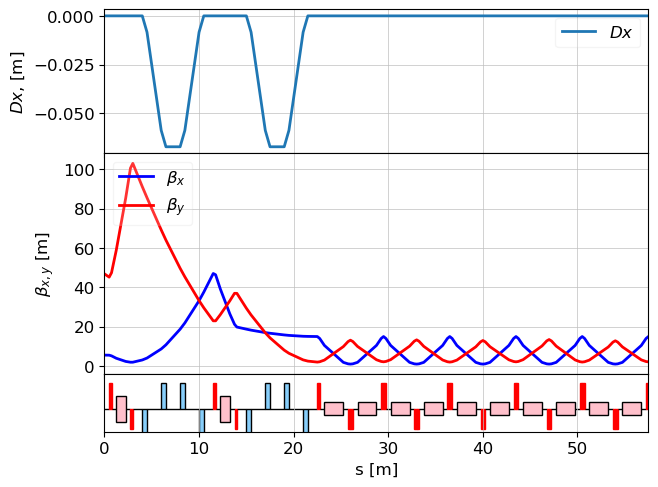
So twiss parameters on the entrance of the echo lattice are:
# inverting alphas again is needed
tws_e = Twiss()
tws_e.beta_x = tws_echo_inv_end.beta_x
tws_e.beta_y = tws_echo_inv_end.beta_y
tws_e.alpha_x = -tws_echo_inv_end.alpha_x
tws_e.alpha_y = -tws_echo_inv_end.alpha_y

lat_echo_fodo = MagneticLattice((echo, fodo) )

tws_all = twiss(lat_echo_fodo, tws_e)

plot_opt_func(lat_echo_fodo, tws_all, legend=False)
plt.show()
Step 3. Matching section
Q1 = Quadrupole(l=0.3, k1=1)
Q2 = Quadrupole(l=0.3, k1=1)
Q3 = Quadrupole(l=0.3, k1=1)
Q4 = Quadrupole(l=0.3, k1=1)


m1 = Marker()
m2 = Marker()
dm = Drift(l=1.5)
match_sec = (m1, dm, Q1, dm, Q2, dm, Q3, dm, Q4, dm, m2)

lat_m = MagneticLattice(match_sec[::-1])
Matching
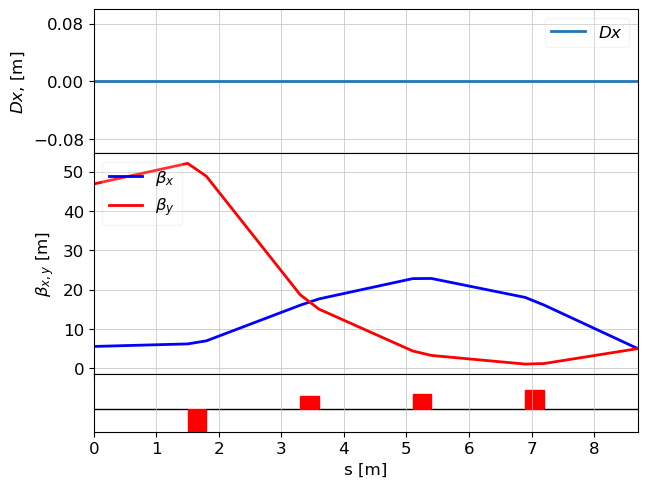
As it was mentioned above, matching will not give you desired values if your geometry or initial conditions are poor. Because our goal is not a good design but showing the concept of OCELOT usage, we choose very relaxed conditions. Twiss parameters on the entrance of the matching section:
- beta_x = 5
- beta_y = 5
- alpha_x = not defined
- alpha_y = not defined
The Twiss parameters on the exit of the matching section are defined by the echo section. Since the matching section is solved in reverse, these exit Twiss parameters are used as the initial condition of the MatchProblem.
tw_match_exit = Twiss()
tw_match_exit.beta_x = tws_e.beta_x
tw_match_exit.beta_y = tws_e.beta_y
tw_match_exit.alpha_x = -tws_e.alpha_x
tw_match_exit.alpha_y = -tws_e.alpha_y

problem = MatchProblem(lat_m, tw_match_exit, periodic=False)

# Variables
problem.vary_element(Q1, quantity="k1", limits=(-5, 5))
problem.vary_element(Q2, quantity="k1", limits=(-5, 5))
problem.vary_element(Q3, quantity="k1", limits=(-5, 5))
problem.vary_element(Q4, quantity="k1", limits=(-5, 5))

# Twiss targets for marker m1
problem.target_twiss(m1, "beta_x", 5.0, weight=1e6, tol=1e-6)
problem.target_twiss(m1, "beta_y", 5.0, weight=1e6, tol=1e-6)

result = problem.solve(solver="ls_trf", max_iter=300)

for i, q in enumerate([Q1, Q2, Q3, Q4]):
    print("Q"+str(i+1)+".k1 = ", q.k1)

tws = twiss(lat_m, tw_match_exit)
plot_opt_func(lat_m, tws, legend=False)
plt.show()

tws0 = Twiss(tws[-1])
tws0.alpha_x = -tws0.alpha_x
tws0.alpha_y = -tws0.alpha_y
Q1.k1 = 0.6912583443683542 Q2.k1 = 0.5269364352760115 Q3.k1 = 0.450382988907434 Q4.k1 = -0.9455871893838916
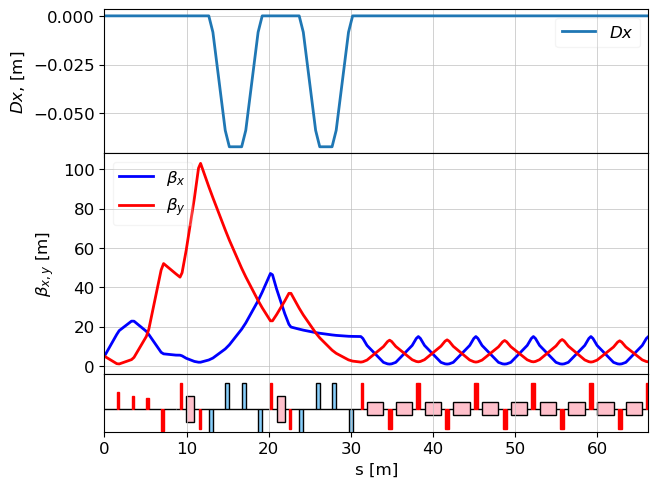
FINAL Lattice
cell = (match_sec, echo, fodo)
# fodo quadrupoles

lat = MagneticLattice(cell)

tws = twiss(lat, tws0)
plot_opt_func(lat, tws, legend=False)
plt.show()